
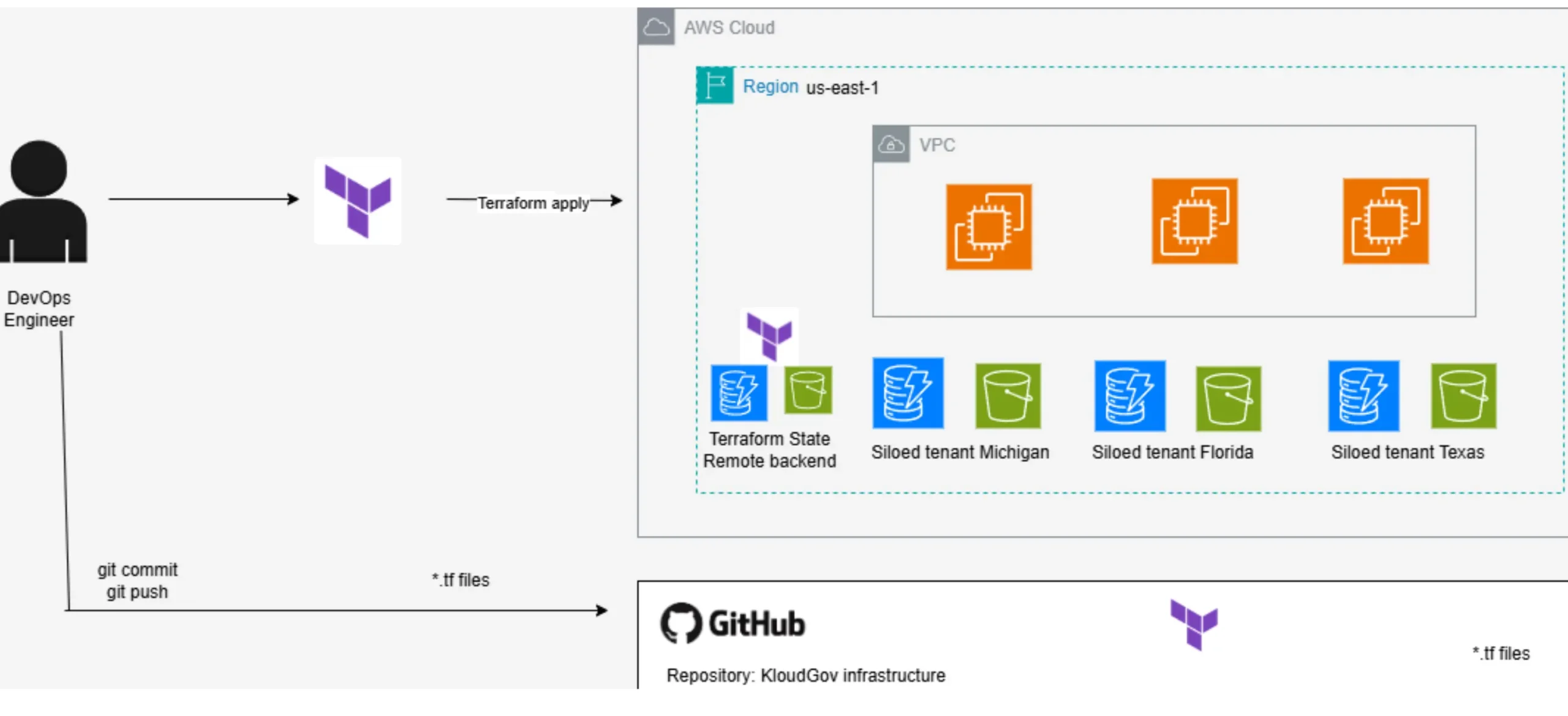
In Part 1 of this series, I built a reusable Terraform module structure for multi-tenant AWS infrastructure. In Part 2, I secured the Terraform state file with a remote S3 backend and DynamoDB-based locking. Both of those steps solved real problems, but they still relied on someone manually running terraform apply from a terminal.
That’s the last gap this series needs to close. This post, Part 3, integrates the KloudGov infrastructure project with GitHub and takes it a step further by wiring up a CI/CD pipeline so that infrastructure changes are versioned, reviewed, and applied automatically. This is the point where the project stops being “a Terraform script I run by hand” and becomes an actual production-ready workflow.
Why GitHub Integration Matters for Infrastructure Code
Terraform modules and remote state solve how infrastructure is structured and where its state lives. Neither one solves who changed what, when, and why. That’s what version control brings to the table, and it matters just as much for infrastructure code as it does for application code, arguably more, since a bad infrastructure change can take down an entire environment.
Pushing this project to GitHub accomplishes three things at once:
Versioning — every change to the infrastructure is tracked, timestamped, and attributed to a specific commit.
Collaboration — multiple engineers can propose, review, and merge infrastructure changes through pull requests, instead of editing files directly on a shared EC2 instance.
Automation — once the code lives in GitHub, it can trigger a CI/CD pipeline that runs terraform plan and terraform apply automatically, removing manual execution entirely.
Before any of that is possible, though, there’s a foundational step that’s easy to overlook: making sure sensitive and temporary files never make it into the repository in the first place.
Step 1: Creating the .gitignore File
Navigate into the infrastructure repository:
cd kloud-gov-infrastructure
Take a look at what’s actually sitting inside the Terraform working directory:
ls -la terraform/
If you’ve already run terraform init and terraform apply at this point, you’ll notice a handful of files and folders that have no business being pushed to GitHub: the .terraform/ provider cache, local state files, .tfvars files that may contain environment-specific values, and lock files. None of these belong in version control, and some of them are an active security risk if committed (state files, in particular, can contain sensitive resource attributes).
Before creating a .gitignore file, it’s worth seeing what happens without one:
git status
git add .
git status
At this point, git status will show every one of those Terraform-generated files staged for commit exactly what you don’t want. Undo that:
git rm -r --cached . # remove everything from the staging area
git status
Now create the .gitignore file:
touch .gitignore
.gitignore is a file Git uses to determine which files or folders should never be tracked, regardless of how many times someone runs git add . It’s the standard mechanism for keeping temporary build artifacts, local configuration, and sensitive files out of a repository.
Add the following entries to exclude Terraform-specific files:
.terraform/
.tfstate
.tfstate.backup
.tfvars
.tfplan
.tfstate.lock.info
A quick note on why each of these matters:
.terraform/ — a local cache of provider plugins and modules. It’s large, environment-specific, and trivially regenerated by terraform init. There’s no reason to version it.
.tfstate / .tfstate.backup — should never be committed, full stop. This is exactly why Part 2 moved state management to a remote S3 backend; state doesn’t belong in Git at all.
.tfvars — often contains environment-specific or sensitive input values. Even when it doesn’t contain secrets directly, it can reveal architectural details that shouldn’t be public.
.tfplan — a binary plan output that’s only relevant to a single run; it has no long-term value in version control.
.tfstate.lock.info — a transient lock artifact, not something to track.
With .gitignore in place, run git add . again and confirm the results:
git status
git add .
git status
This time, git status should show only the actual Terraform configuration files: main.tf, variables.tf, outputs.tf, backend.tf, with everything else correctly excluded.
Step 2: Synchronizing the Repository
With the working directory clean, commit and push the infrastructure code to GitHub:
git status
git add .
git status
git commit -m "AWS Infrastructure Terraform Configuration - first commit"
git push -u origin main
At this point, the kloud-gov-infrastructure repository on GitHub contains exactly what it should: reusable Terraform modules, remote backend configuration, and root-level configuration files, with no sensitive or temporary files in the commit history.
Step 3: Validating Locally Before Automating
Before wiring up automation, it’s worth confirming the configuration still applies cleanly on its own:
cd terraform
terraform apply
And confirming teardown works as expected:
terraform destroy
This validation step matters more than it might seem. Once a CI/CD pipeline is driving apply and destroy automatically, you want full confidence that the underlying configuration is solid; automation makes mistakes happen faster, not smarter.
Step 4: Building the CI/CD Pipeline with GitHub Actions
This is where the project moves from “version-controlled” to genuinely production-ready. With the repository live on GitHub, the next step is to automate terraform plan and terraform apply using GitHub Actions, so that infrastructure changes flow through a repeatable, auditable pipeline instead of a manual terminal session.
Authenticating with AWS: Skip Static Keys, Use OIDC
The pipeline needs AWS credentials, but the best-practice approach here isn’t to store access keys and secrets as GitHub secrets; it’s to avoid long-lived credentials entirely. GitHub Actions supports OIDC (OpenID Connect) federation, where GitHub requests short-lived, auto-expiring credentials directly from AWS at runtime. There’s nothing to store, rotate, or accidentally leak, because no static secret ever exists.
Setting this up takes two pieces on the AWS side:
1. An IAM OIDC identity provider, trusting token.actions.githubusercontent.com as a federated identity source, with the audience set to the standard value AWS’s STS service expects:
sts.amazonaws.com
2. An IAM role with a trust policy scoped to this specific repository and branch:
{
  "Version": "2012-10-17",
  "Statement": [
    {
      "Effect": "Allow",
      "Principal": {
        "Federated": "arn:aws:iam::<ACCOUNT_ID>:oidc-provider/token.actions.githubusercontent.com"
      },
      "Action": "sts:AssumeRoleWithWebIdentity",
      "Condition": {
        "StringEquals": {
          "token.actions.githubusercontent.com:aud": "sts.amazonaws.com"
        },
        "StringLike": {
          "token.actions.githubusercontent.com:sub": "repo:YOUR-ORG/kloud-gov-infrastructure:ref:refs/heads/main"
        }
      }
    }
  ]
}
That sub-condition is the important part; it means only workflows that run on the main branch of this exact repository can ever assume this role. No other repo, no other branch, and no static credential sitting in GitHub’s secrets store at all.
The role itself is attached to a least-privilege permissions policy scoped to exactly what this Terraform configuration provisions: EC2 instances, DynamoDB tables (both tenant tables and the state lock table from Part 2), and S3 buckets (both tenant buckets and the state backend bucket) nothing broader, and no IAM permissions of any kind, since this pipeline never needs to create users, roles, or policies.
Creating the Workflow File
In the repository root, create the following directory structure:
mkdir -p .github/workflows
touch .github/workflows/terraform.yml
Populate terraform.yml with a pipeline that runs terraform plan on every pull request, and terraform apply automatically on merges to main:
name: Terraform CI/CD

on:
  pull_request:
    branches: [main]
    paths:
      - "terraform/**"
  push:
    branches: [main]
    paths:
      - "terraform/**"

jobs:
  terraform:
    name: Terraform Plan & Apply
    runs-on: ubuntu-latest
    permissions:
      id-token: write
      contents: read
    defaults:
      run:
        working-directory: terraform

    steps:
      - name: Checkout repository
        uses: actions/checkout@v4

      - name: Configure AWS credentials via OIDC
        uses: aws-actions/configure-aws-credentials@v4
        with:
          role-to-assume: arn:aws:iam::<ACCOUNT_ID>:role/kloudgov-terraform-apply-main
          aws-region: us-east-1

      - name: Set up Terraform
        uses: hashicorp/setup-terraform@v3
        with:
          terraform_version: 1.9.0

      - name: Terraform Format Check
        run: terraform fmt -check

      - name: Terraform Init
        run: terraform init

      - name: Terraform Validate
        run: terraform validate

      - name: Terraform Plan
        run: terraform plan -out=tfplan

      - name: Terraform Apply
        if: github.ref == 'refs/heads/main' && github.event_name == 'push'
        run: terraform apply -auto-approve tfplan
A few design decisions worth calling out:
- permissions: id-token: write — this is what allows the job to request an OIDC token from GitHub in the first place. Without it, configure-aws-credentials has nothing to present to AWS. contents: read covers the checkout step, and neither permission extends beyond this one job.
- No AWS_ACCESS_KEY_ID or AWS_SECRET_ACCESS_KEY anywhere — that’s the entire point of the OIDC swap. Every credential this job uses is minted fresh for that specific run and expires automatically once the job finishes.
- paths: [“terraform/**”] — the pipeline only triggers when files inside the terraform/ directory change, so unrelated commits to the application repository don’t trigger unnecessary infrastructure runs.
- Plan on pull requests, apply on merge — this mirrors the exact review discipline a production team needs. Anyone can open a PR and see the plan output before anything is applied, but only a merge to main triggers the actual apply. This turns every infrastructure change into a reviewable, approvable event.
- terraform fmt -check — fails the pipeline if code isn’t properly formatted, enforcing consistency without requiring manual review for style.
- -auto-approve scoped to apply, not plan — plans always require human review via the PR; only the already-reviewed, merged configuration gets applied automatically.
One nuance worth flagging: because the trust policy above scopes the role to main only, this single-role setup means configure-aws-credentials will only succeed on the push trigger; a pull_request run from a feature branch won’t be able to assume the role, since GitHub’s token won’t match the sub condition. For a solo or portfolio-scale project, that’s a reasonable tradeoff. Teams wanting plan to run credentialed on every PR branch would typically create a second, more loosely-scoped read-only role for that purpose.

Why Plan-on-PR, Apply-on-Merge Is the Right Pattern
This two-stage pattern is deliberate, and it’s worth understanding why it’s the standard for infrastructure pipelines specifically:
terraform plan is read-only and shows what would change without touching any real infrastructure. Running it on every pull request gives reviewers full visibility into the blast radius of a change before approving it.
terraform apply is where actual changes happen. Restricting it to merges into main means nothing gets applied to real infrastructure without first passing through code review, the same discipline you’d expect for application code, now extended to infrastructure.
This is the core idea behind GitOps: your Git repository becomes the single source of truth for the infrastructure state, and the pipeline is the only thing with permission actually to change AWS resources. No more manual terraform apply from a laptop, no more “who ran this and why” mysteries.
Step 5: Testing the Pipeline End-to-End
With the workflow file committed and pushed, the full loop looks like this:
Create a feature branch and make an infrastructure change, for example, adding a new state to the states variable.
Open a pull request against main.
GitHub Actions automatically runs terraform fmt, init, validate, and plan, and the plan output appears directly in the PR’s checks.
A teammate reviews the plan output, confirms the expected resources, and approves the PR.
On merge, GitHub Actions runs terraform apply automatically, provisioning the new infrastructure without anyone touching a terminal.

This is the same underlying Terraform configuration as in Parts 1 and 2; the modules and the remote backend are no longer dependent on someone remembering to run the right commands in the right order.
Step 6: Cleaning Up
To avoid ongoing AWS charges while testing this pipeline, tear down any resources created during validation:
terraform destroy
Step 7: Stopping EC2/IDE
Stop your EC2 instance once you’ve wrapped up testing to avoid unnecessary compute costs.
What This Completes
Looking back across all three parts of this series, here’s the full picture of what’s been built:
Part 1 — a reusable Terraform module structure, capable of provisioning isolated infrastructure for any number of tenants from a single definition.
Part 2 — a secure, remote backend using S3 and DynamoDB, replacing risky local state with encrypted, centralized, lock-protected storage.
Part 3 — full GitHub integration with a .gitignore policy that keeps sensitive files out of version control, and a GitHub Actions pipeline authenticated via OIDC that automates plan and apply through a proper review workflow, with no static AWS credentials stored anywhere.
Together, this is no longer a one-off PoC; it’s a legitimate, production-shaped Infrastructure as Code workflow: modular, stateful, versioned, reviewed, and automated.
Key Takeaways
A .gitignore file isn’t optional for Terraform projects; committing state files, .tfvars, or the .terraform/ cache is a genuine security and hygiene risk.
git rm -r –cached . is the fastest way to reset a repository that already has the wrong files staged before your .gitignore takes effect.
GitHub integration turns infrastructure code into something reviewable and collaborative, not just something one engineer runs locally.
OIDC federation is the stronger choice over static access keys for GitHub Actions: no secrets to store or rotate, and credentials expire automatically at the end of each run.
A CI/CD pipeline that runs plan on pull requests and apply only on merge to main enforces the same review discipline for infrastructure that good teams already apply to application code.
This plan-then-apply pattern is the foundation of GitOps, treating your Git repository as the single source of truth for infrastructure state.
That completes the KloudGov series: from modular Terraform design, to secure state management, to a fully automated, OIDC-authenticated CI/CD pipeline. The same pattern modules, remote state, GitOps automation scales far beyond this PoC and reflects how real teams manage infrastructure at production scale.
Setting up the IAM role’s permissions for this pipeline surfaced a string of undocumented errors along the way. If you’re implementing this yourself, it’s worth reading the companion troubleshooting post, “Terraform CI/CD IAM Permissions: Debugging the Errors Nobody Documents,” which walks through exactly what went wrong and why.

