Security and access control are foundational to any cloud environment, and AWS Identity and Access Management (IAM) is the core service that governs how users, applications, and services securely interact with AWS resources. AWS IAM allows organizations to define who can access AWS and what level of actions they can perform, maintaining strong security without sacrificing flexibility.
AWS Identity and Access Management (IAM) administrators can manage identities, permissions, and authentication methods at scale using AWS IAM users, groups, roles, and policies, enabling fine-grained access control that aligns with real-world job functions and workloads. This approach helps organizations enforce security best practices, such as the principle of least privilege and the use of temporary credentials.
This article discusses how AWS Identity and Access Management (IAM) works, how users, groups, and roles are created and managed, and how policies control authorization. You’ll also understand the difference between console and programmatic access, why the root user must be protected, and how IAM supports secure cloud operations.
What is AWS Identity and Access Management (IAM), and How Does It Work?
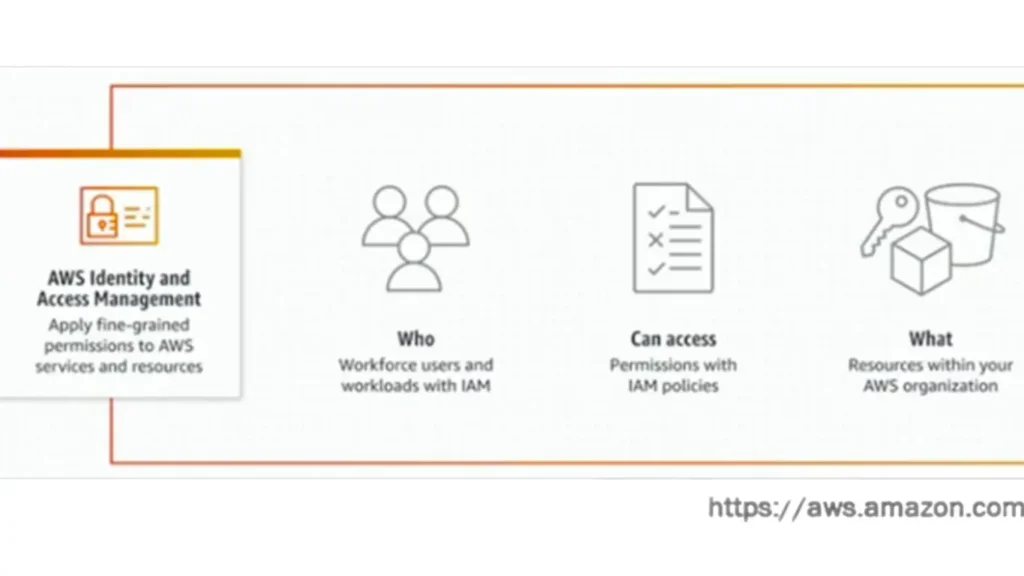
Identity and Access Management (IAM) is a service that securely manages access to AWS resources. It enables you to determine who is authenticated (logged in) and authorized (with permissions) to use these resources.
Features
- Set permissions, guardrails, and fine-grained access
- Manage workload and workforce identities across the AWS account
- Use temporary security credentials and permissions set to access your AWS resources
- Analyze access and validate IAM policies as you move toward least privilege
How it works:
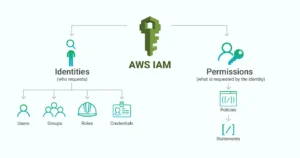
AWS Identity and Access Management (IAM) Users, Groups, and Roles
An IAM user is an identity within your AWS account that has specific permissions for a single person or application. It is used for authentication and must follow the principle of least privilege.
An IAM group is an identity that specifies a collection of IAM users. It cannot be used to access AWS services directly. You can use groups to specify permissions for multiple users at a time. Groups make permissions easier to manage for large user sets.
The principle of least privilege, also known as “privilégio mínimo,” is based on the concept that a user should have access only to what is necessary to perform their responsibilities, without additional access. The more access a user has, the greater the negative impact if their account is compromised or represents an internal threat.
An IAM role is an identity within your AWS account that has specific permissions, like an IAM user, but it isn’t associated with a specific person. You can temporarily assume an IAM role through multiple entities (individuals, AWS services, or applications).
Policies and Permissions (Authorization)
AWS authorization is managed through policies and permissions, which are created and attached to IAM identities (users, groups, or roles) or to AWS resources. Permissions in the policies determine whether the request is allowed or denied. Most policies are stored in AWS as JSON documents:
{
     "Version": "2024-02-01",
     "Statement": {
       "Effect": "Allow",
       "Action": "S3:ListBucket",
       "Resource": "arn:aws:s3:::kb_bucket_example"
   }
}
AWS Interfaces Access
AWS provides multiple interfaces that allow users and applications to interact securely with cloud resources, such as the AWS Management Console, Software Development Kits (SDKs), and the Command Line Interface (CLI).
The AWS Management Console is a web-based graphical interface that allows users to manage AWS services in a browser.
Access to the AWS Management Console is granted through IAM users, federated identities, or Identity Center (formerly AWS SSO). Permissions are enforced using IAM policies, ensuring users can only see and perform actions they are authorized to do. The console provides broad visibility and control, and, for security, AWS strongly recommends enabling multi-factor authentication (MFA) to enforce least-privilege permissions and limiting console access for sensitive accounts, such as the root user.
AWS Software Development Kits (SDKs) enable developers to interact with AWS services programmatically and are available for multiple programming languages, including Python (Boto3), Java, JavaScript, Go, and NET. They are used by applications, automation scripts, CI/CD pipelines, and infrastructure-as-code tools.
SDK access is typically granted via programmatic credentials, such as an access key ID or temporary credentials assumed via an IAM role. Programmatic users don’t have access to the console interface. The SDK handles request signing, authentication, retries, and error handling, making it easier to securely and efficiently integrate AWS services into applications. Regularly rotating access keys, enforcing least-privilege access, and monitoring the use of programmatic users are essential security practices.
Using SDKs with IAM roles and temporary credentials is a security best practice, as it eliminates the need to store long-term access keys in code. This approach is widely used in modern cloud-native architectures and automated workflows.
The AWS Command Line Interface (CLI) is a unified, text-based tool that allows users to manage and interact with AWS services directly from a terminal or command prompt. Instead of using the graphical AWS Management Console, use it for faster, repeatable, and automated interactions with AWS resources.
The AWS IAM authentication and authorization use the CLI to control access. Users authenticate using programmatic credentials, such as access keys or temporary credentials assumed through IAM roles. Every command executed through the CLI is evaluated against IAM policies to determine whether the action is allowed or denied, enforcing the principle of least privilege.
The Root User
The AWS root user is the account owner identity created when an AWS account is first set up. This user has full, unrestricted access to all AWS services, resources, billing information, and account-level settings. Because of its powerful permissions, the root user should be used only for a small number of critical tasks and not for daily operations.
AWS strongly recommends protecting the root user by enabling multi-factor authentication (MFA), using a strong and unique password, and avoiding the creation of access keys for the root account. Regular activity monitoring should also be enabled to detect any unauthorized usage.
From a security perspective, misuse of the root user represents a significant risk. Best practice is to lock down the root user and delegate everyday administrative tasks to IAM users or roles with appropriately scoped permissions.
Conclusion
AWS Identity and Access Management (IAM) is one of the most critical services in AWS, as it directly controls access to every resource in your cloud environment by properly managing users, groups, roles, and policies. Organizations can reduce security risks while maintaining operational efficiency. Features like temporary credentials, identity federation, and policy analysis tools make IAM both powerful and flexible.
Applying best practices such as least-privileged access, secure handling of programmatic credentials, and limiting the use of root users ensures a strong security posture from day one. Whether you are a beginner learning AWS fundamentals or an IT professional managing production workload, understanding AWS Identity and Access Management (IAM) is essential for building secure, scalable, and compliant cloud solutions.